Are you running a wholesale operation on WooCommerce? A dedicated wholesale login page for your B2B customers isn’t optional; it’s the front door to your entire B2B experience. Without one, wholesale customers land on the same generic My Account page as everyone else. Which doesn’t exactly inspire confidence in a serious business buyer.
This guide walks you through setting up a proper wholesale login and registration system using the best B2B WooCommerce Wholesale plugin. No custom wholesale store development.
Why Does a Wholesale Login Page Matter?
Your wholesale buyers aren’t casual shoppers. They’re business owners who want a professional, separate experience from your retail store. A dedicated login page does a few important things:
It keeps your wholesale and retail operations cleanly separated. This enables you to determine who can access wholesale prices, since only authorized B2B buyers can, not just anyone. It also lends credibility to your store when potential business partners evaluate it as a future and long-term partner.
The absence of such a barrier means that anyone can accidentally stumble upon your wholesale prices, which may make your business appear unprofessional.
What a Good Wholesale Login System Includes
Before jumping into setup, here’s what a complete wholesale login system actually needs:
- A dedicated registration form separate from the standard WooCommerce signup
- An admin approval workflow so you control who gets wholesale access
- Role assignment on approval, so pricing kicks in automatically
- Email notifications at every stage: application received, approved, rejected
- Login restrictions that hide prices or the store entirely from non-approved users
- An upgrade path for existing retail customers who want to become wholesalers
Step-by-Step: Setting Up Your Wholesale Login Page in WooCommerce
Step 1: Install Wholesale for WooCommerce
Install and activate the Wholesale for WooCommerce plugin from your WordPress dashboard. Once active, a Wholesale menu appears in your admin sidebar, which is your control center for everything that follows.
Step 2: Create Your Wholesale User Role
Before building the login page, you need a role for approved wholesalers to be assigned to.
- Go to Wholesale → User Roles and click Add New Role
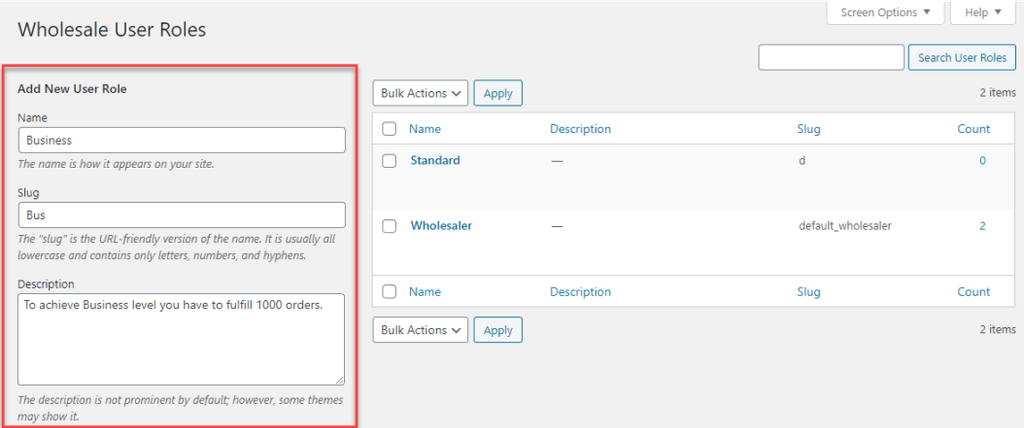
- Enter a name like “Wholesaler” or “Trade Customer,” a slug, and a brief description
- Set this as your default role so every approved applicant gets automatically placed here
- Configure tax exemptions, restricted payment gateways, or shipping method limits if needed
- Click Save
This role is what separates a wholesale buyer from a regular retail customer in your store.
Step 3: Build the Wholesale Registration Form
- Create a new page in WordPress, call it something like “Wholesale Registration” or “Trade Account Application.”
- Add the shortcode [wwp_registration_form] to the page and publish it
- Go to Wholesale → Registration → Default Fields to customize what the form collects
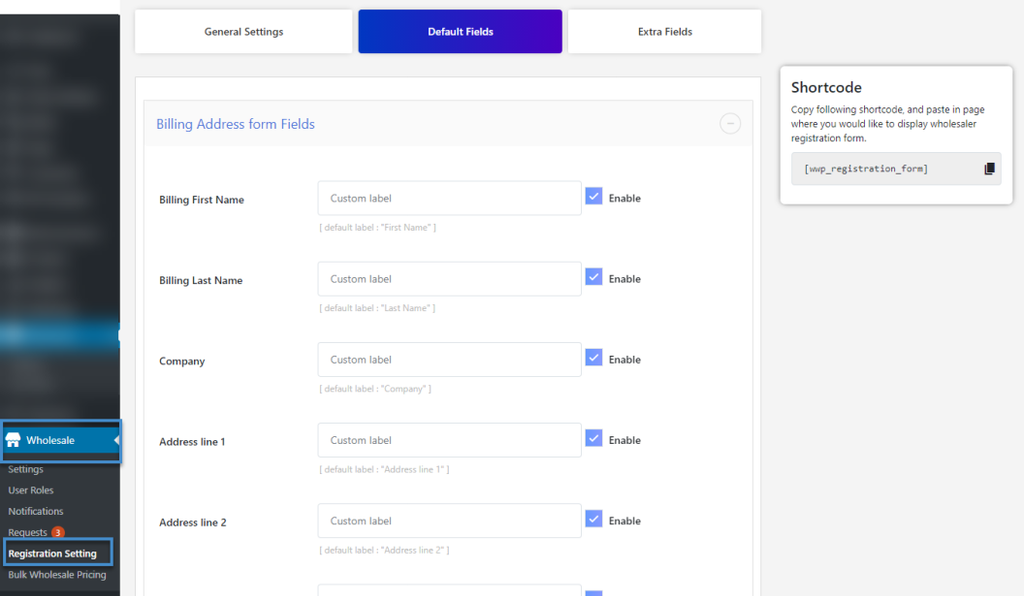
You can enable or disable fields, including billing address, shipping address, Tax ID, file upload, and up to four custom text fields. Only ask for what you actually need; shorter forms get more completions.
- Enable Confirm Password Field from Registration Settings → Other Fields for a cleaner signup experience
- Add reCAPTCHA V2 or V3 to block spam applications
Step 4: Override the Default WooCommerce My Account Page (Optional but Recommended)
By default, WooCommerce shows its standard registration form on the My Account page. You can replace it with your wholesale form instead.
- Go to Wholesale → Settings → Login Restrictions
- Enable “Override registration form on the My Account page.”
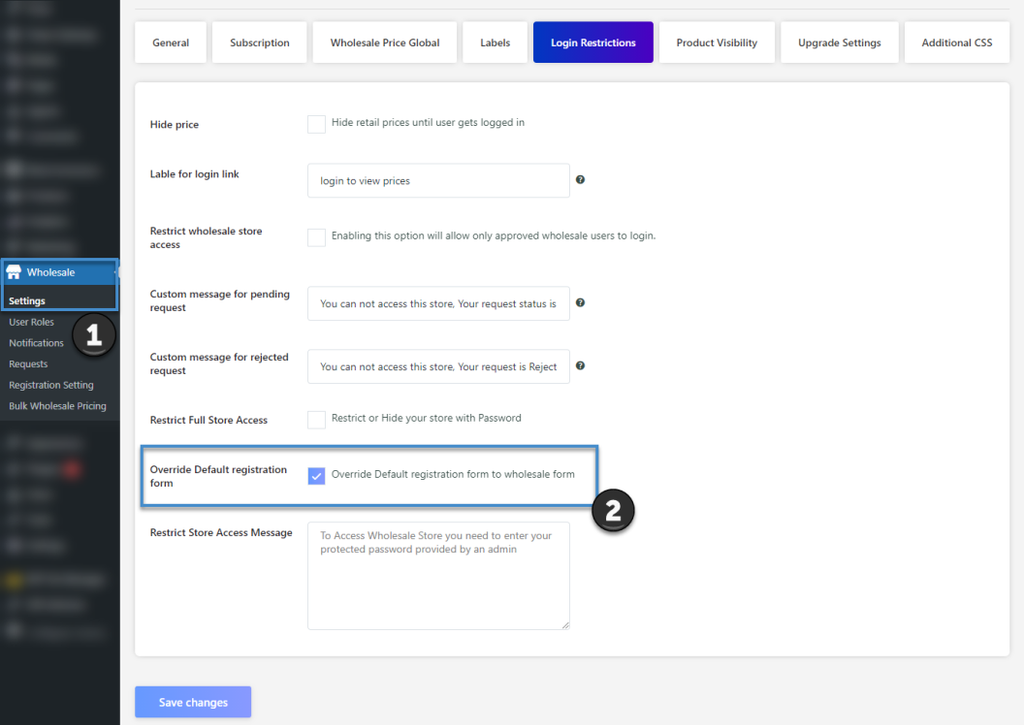
Now any visitor who lands on your My Account page sees the wholesale registration form instead of the generic WooCommerce one. This turns your existing My Account page into a converting wholesale login page.
Step 5: Set Up the Approval Workflow
- Go to Wholesale → Requests, every submitted application appears here
- Review each applicant’s details, then Approve or Reject with an optional note explaining your decision
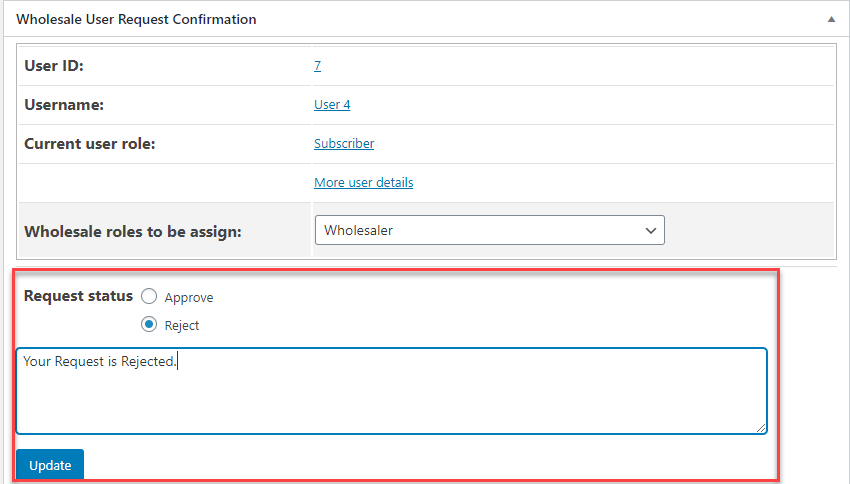
- On approval, the wholesale role is automatically assigned, and the buyer gains access to wholesale pricing immediately
You can also enable auto-approval if you run an open wholesale program and want registrants to get access instantly without manual review.
Step 6: Configure Email Notifications
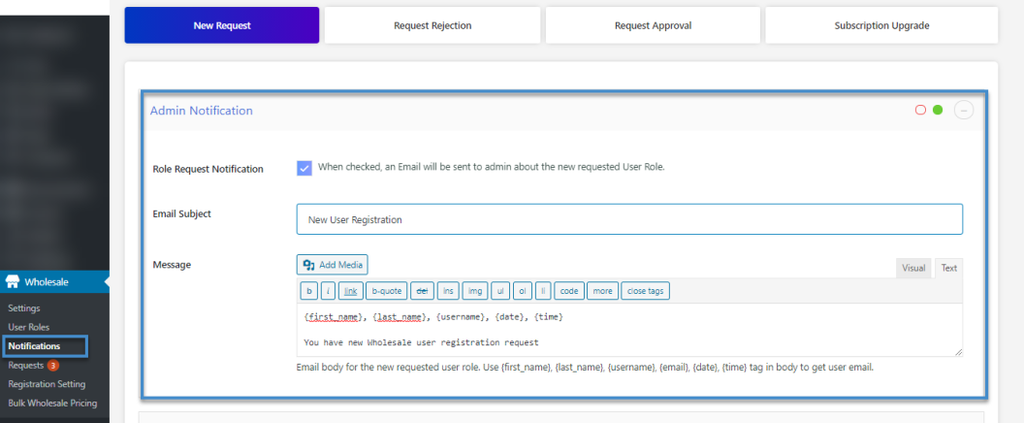
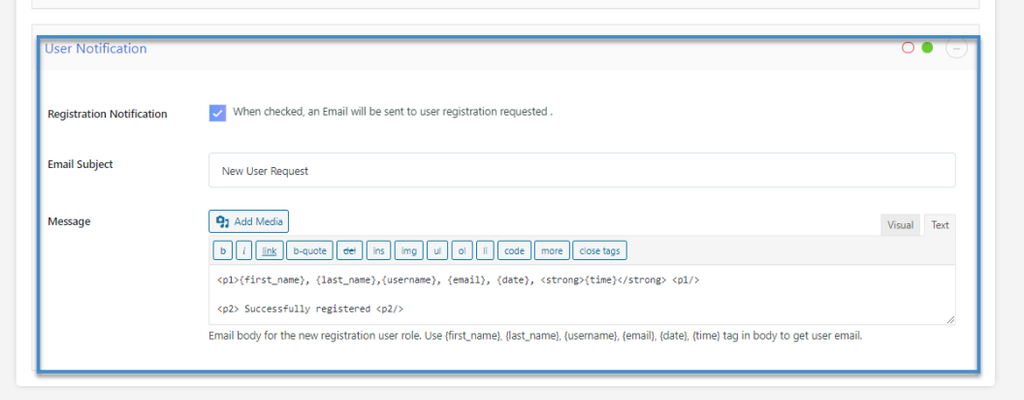
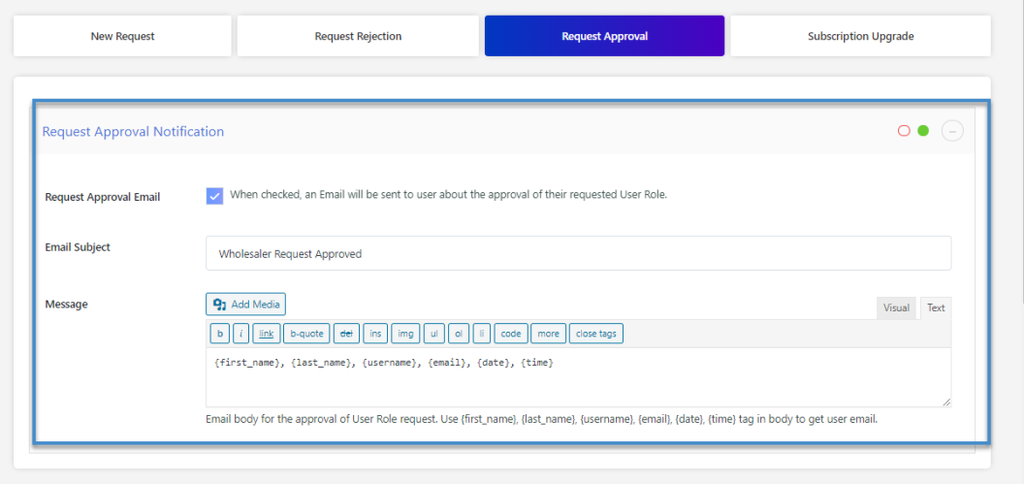
Go to Wholesale → Notifications and set up emails for each stage:
- New Request notifies you (or a custom recipient) when someone applies
- User Registration confirms to the applicant that their request was received
- Request Approved tells the buyer they now have wholesale access
- Request Rejected notifies them with your custom rejection message
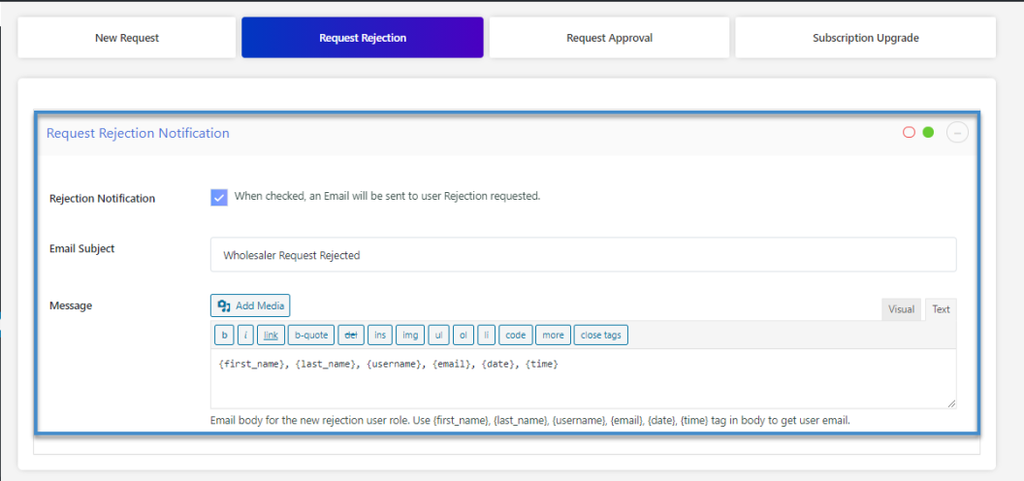
All email content is fully customizable thanks to Wholesale for WooCommerce. You can also disable admin notifications and route them to a specific team email address instead.
Step 7: Add Login Restrictions
This is where you lock down wholesale pricing from the public.
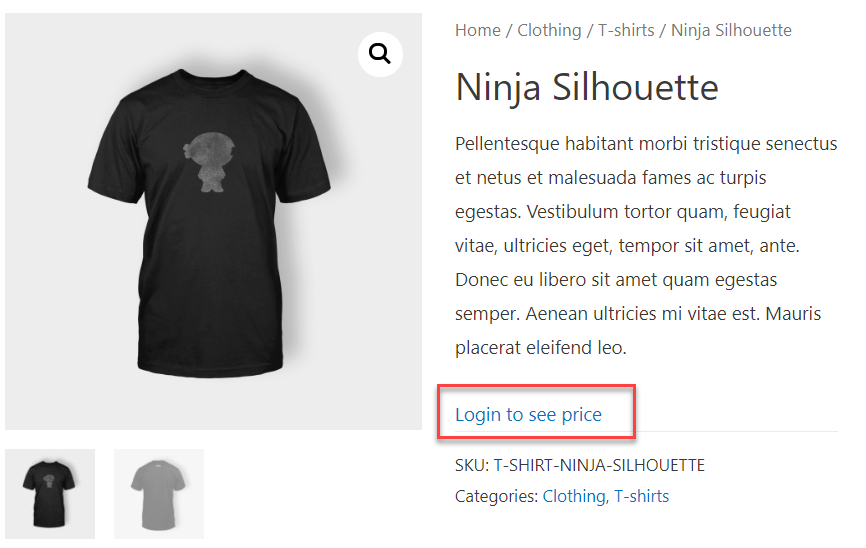
- Go to Wholesale → Settings → Login Restrictions
- Enable Hide Price to replace product prices with a custom message for non-logged-in users, something like “Login for wholesale pricing.”
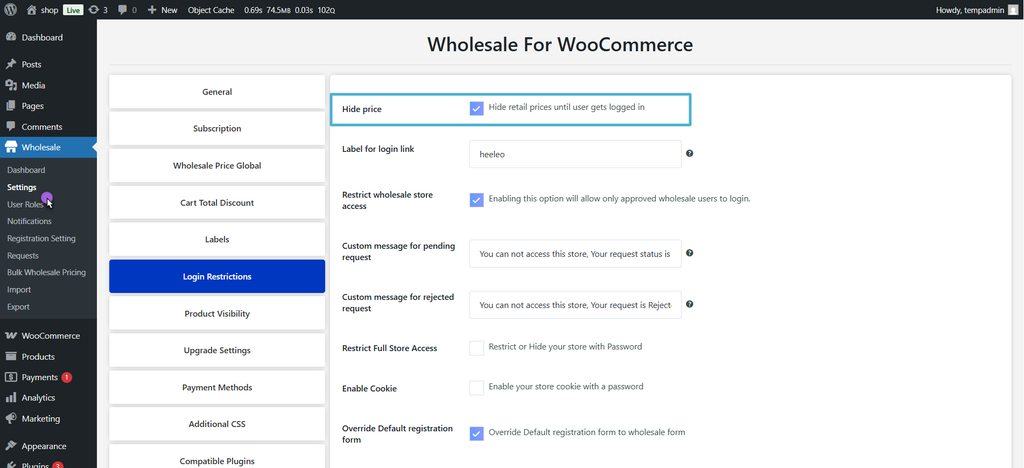
- Enable Restrict Store Access to block pending or unapproved accounts from browsing wholesale products entirely
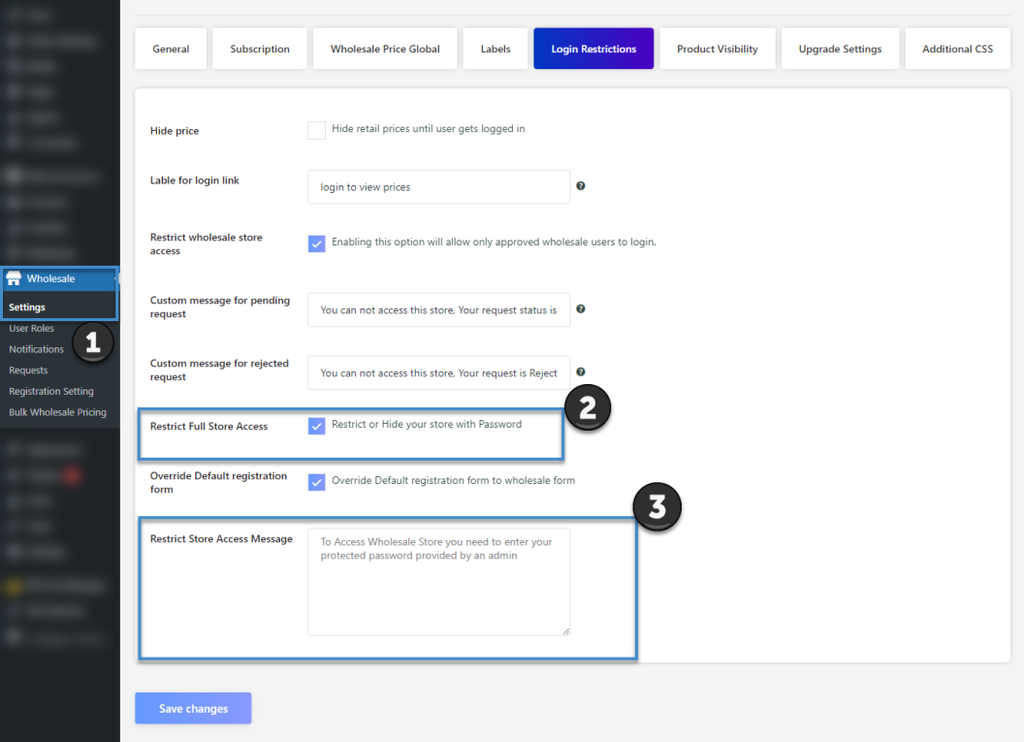
- Enable cookies and set an interval (e.g., 7 or 30 days) so approved wholesalers stay logged in automatically on return visits
Step 8: Add an Upgrade Path for Retail Customers
Already have retail customers who want to apply for wholesale access? Simple, you can add an upgrade tab to the WooCommerce My Account page.
- Go to Wholesale → User Roles and edit your wholesale role
- Enable the Upgrade Tab; it appears on the My Account page for non-wholesale users
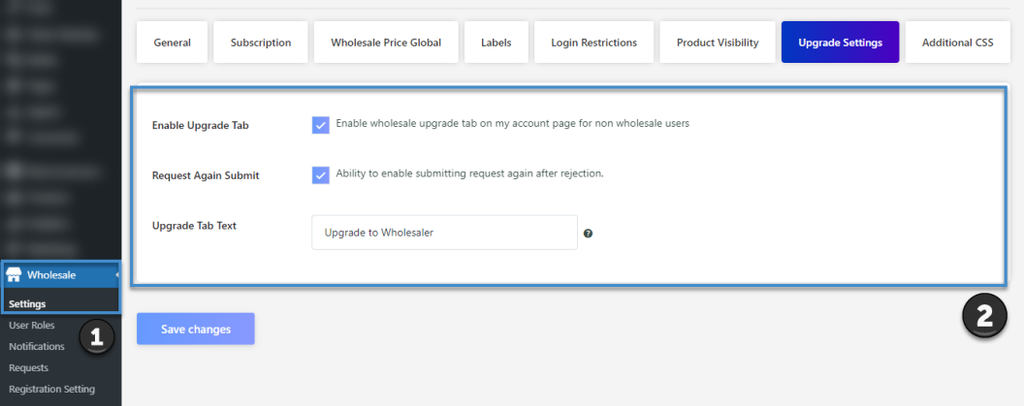
- Enable Resubmit Request so previously rejected applicants can apply again
This turns every existing retail customer into a potential wholesale lead.
How Can You Make Your WooCommerce Wholesale Login Page Better?
A functional login page is the baseline. Here’s what separates a good one from a great one:
Keep the Registration Form Short
Only ask for what you need to make an approval decision. Every extra field reduces completions. Start with the company name, Tax ID, and phone. You can collect more later.
Write a Clear Custom Message for Pending Accounts
When someone is waiting for approval, they shouldn’t see a blank page. Go to Login Restrictions and add a message like “Your application is under review, we’ll be in touch within 24 hours.”
Set a Redirect After Registration
From Wholesale → Settings, you can send approved registrants directly to:
- A specific page or product after signing up
- Your wholesale catalog
- A welcome page instead of a generic confirmation screen
Use the Advanced Form Builder for Extra Fields
From Wholesale → Registration → Extra Fields, you can add text fields, dropdowns, checkboxes, and date fields to collect richer business information from applicants.
Enable the Private Store Option
Suppose your wholesale operation is invite-only. From Login Restrictions, enable Restrict Full Store Access and set a protected password per wholesale role. Only buyers with the password should be able to browse your store.
Final Words
A dedicated wholesale login page is what transforms a standard WooCommerce store into a proper B2B operation. With Wholesale for WooCommerce, the entire wholesale setup, including registration form, approval workflow, role assignment, email notifications, and login restrictions, comes together. You set everything for your wholesale store as you like without coding.
Start using Wholesale for WooCommerce now, and soon you’ll witness that your customers will absolutely love this B2B purchasing experience!