
Can a whole company buy on credit from your WooCommerce B2B store, not just 1 user? With the best AI-Powered B2B Wholesale for WooCommerce v3.4, the answer is yes.
Now you don’t need to install multiple WooCommerce extensions in WordPress for different tasks. The new Company Credit module lets store owners create B2B company accounts, assign wholesale pricing, set credit limits, and allow multiple users to purchase against 1 shared credit pool.
What Company Credit Adds to Your B2B WooCommerce Store
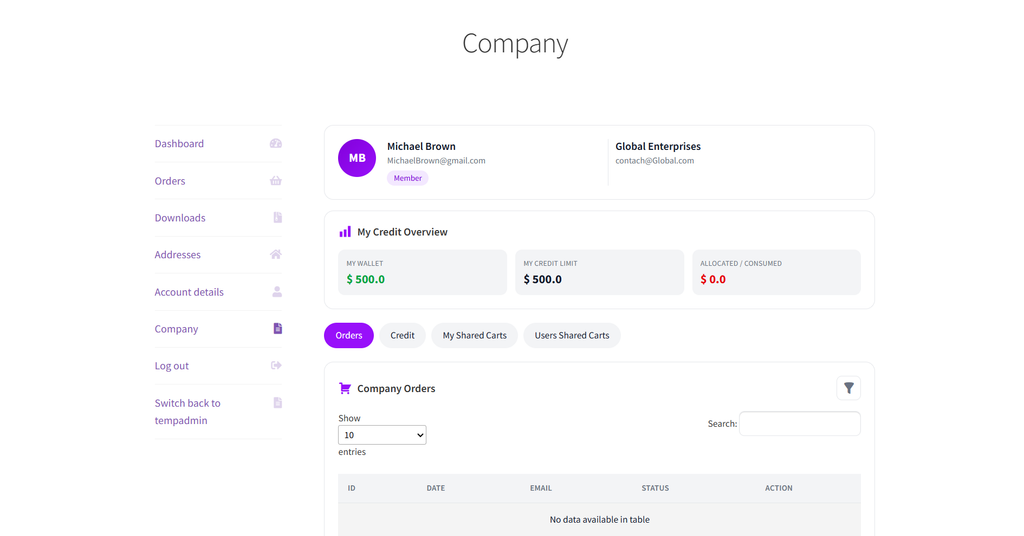
A company account is now a necessity for B2B eCommerce, and it’s not the same as a single wholesale user. It is a shared entity with its own pricing and its own credit pool. Multiple users (Owner, Manager, and Member) can place orders against that pool. Each has its own limits and approval rules set by the admin.
This brings the standalone B2B Company Credit plugin directly into the #1 complete AI-powered B2B for WooCommerce extension in 2026. No separate installation is needed.
Here’s everything you can do with B2B Wholesale for WooCommerce version 3.4.
Give Every Company Its Own Credit Line
Enable the module from Wholesale > Settings > Company Credits, then go to Wholesale > Companies to create your first account.
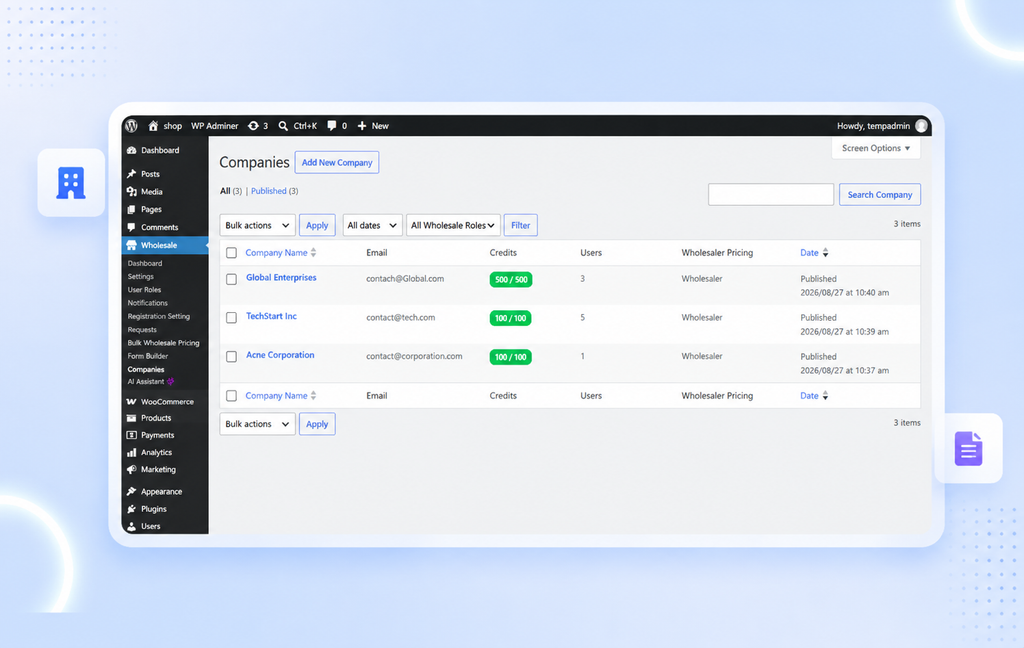
Each company gets a name, an email, and a wholesale pricing role that overrides any individual role its users already hold.
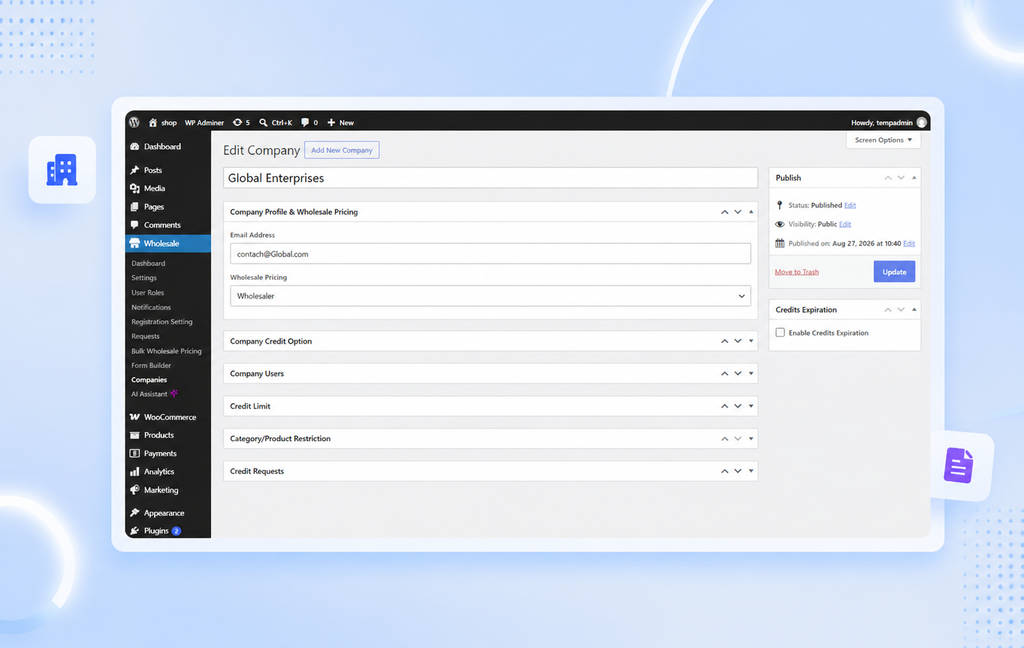
From there, admins assign credit directly to the company. A live Credit Summary shows what has been added, consumed, and left available, so nothing needs to be tracked manually.
- Assign company-level wholesale pricing that overrides individual user roles.
- Add credit to a company’s pool and track it in real time.
- View a full transaction log of every credit addition and deduction.
Owner, Manager, Member: 3 Roles That Run Your WooCommerce Account
Every company runs on a 3-tier hierarchy. The Owner holds full authority, requests limit upgrades from the admin, and approves orders. The Manager places orders and can approve Member requests. The Member places orders and requests their own limit increases.
Each user gets an individual credit limit that the admin or Owner controls, separate from the company’s overall balance. Even if the company has credit left, a user is blocked at checkout the moment they hit their own limit.
Approval Workflows That Keep Every Order in Check
Not every order should go through automatically. Company Approved Orders adds a review step before Company Credit orders are finalized. When enabled, Manager and Member orders wait as Pending until an Owner or Manager reviews them.
Manager Approval narrows that further. Managers can approve or reject only Member orders, while Owners can approve or reject both, regardless of the setting. Rejected orders are never created, so nothing lands in WooCommerce by mistake.
Credit Spend Limiting Feature to Completely Rule Your B2B Store
Store owners can restrict which products or categories a company can buy using credit. Admins choose from 4 modes: all products, all categories, specific inclusions, or specific exclusions.
At checkout, the system checks both the individual limit and the category restriction before allowing Company Credit as a payment method. If either condition fails, checkout is blocked with a clear message, so no order slips through outside the rules the admin set.
Credit Upgrade Requests Without the Back and Forth
Growth does not have to mean a support ticket. Using B2B Wholesale for WooCommerce, you can request a company-wide credit increase directly from the admin, with a reason attached. Managers and Members can also request their own limit increases. Maybe routed to the Owner or, depending on the workflow, to a Manager.
Every request shows the current limit, the requested limit, and its status. Approving it updates the limit automatically, with no manual math on either side.
Shared Carts That Keep Company Teams Synced
Company Credit also adds cart sharing between company users. Any Owner, Manager, or Member can share their cart with another user in the same company, complete with a title so it’s easy to identify later.
Shared carts show up under My Shared Carts and Users Shared Carts in My Account, where recipients can view the products, add them all to their own cart, or delete the share entirely.
Why Company Credit Changes How B2B Buyers Pay in WooCommerce
Companies do not buy the way individuals do. Multiple people place orders, budgets need limits, and someone has to approve the bigger purchases. Company Credit brings that structure into WooCommerce without a separate accounting tool or a manual approval process run over email.
For store owners selling to organizations, schools, or multi-location businesses, this means fewer one-off exceptions and a credit system that enforces its own rules.
Put Company Credit to Work in Your B2B WooCommerce Store Today
Company Credit ships inside B2B Wholesale for WooCommerce v3.4 at no extra cost. Go to Wholesale > Settings > Company Credits to enable the module, then create your first company account under Wholesale > Companies.
Choose the first AI-enabled B2B WooCommerce plugin today and give your B2B buyers a credit system built for how companies actually purchase.