Most WooCommerce stores are built around one simple action: checkout. That works beautifully for B2C eCommerce. A customer sees a product, accepts the price, pays, and the order moves forward. But B2B ecommerce does not always move that fast.
For ordering, B2B buyers often need custom pricing, bulk discounts, internal approvals, shipping clarity, tax details, or a formal quote. A B2B wholesale buyer may be ready to purchase, but they are not always ready to pay immediately. That is why WooCommerce B2B stores need more than a cart and checkout page. They need a quote-to-order workflow.
Let’s break down what a quote-to-order workflow means, why it matters, and how it helps WooCommerce B2B stores close bigger wholesale deals.
What is a Quote-to-Order Workflow in WooCommerce?
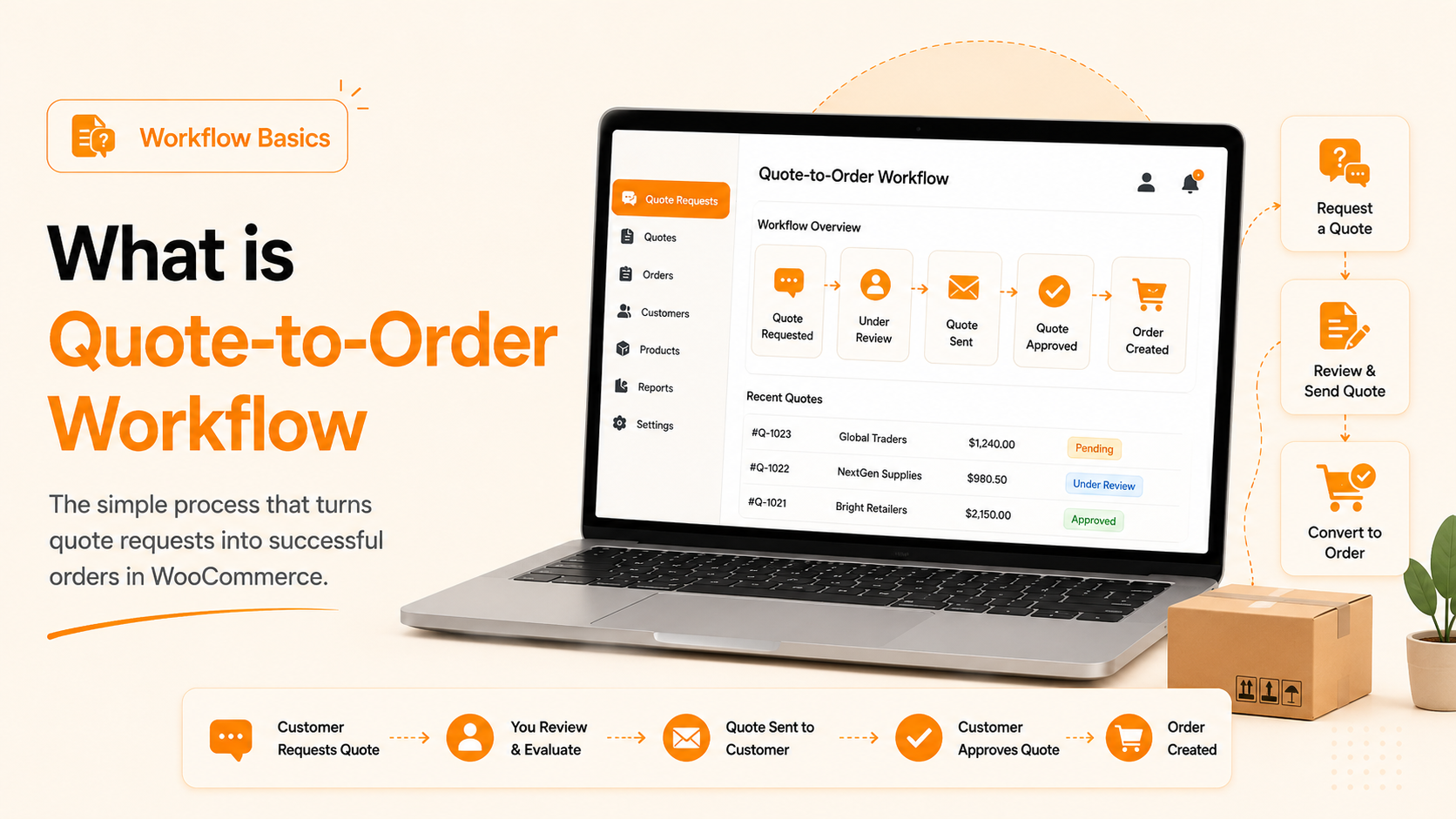
A quote-to-order workflow gives B2B buyers a structured way to request pricing before ordering. And it gives store owners a cleaner way to review, approve, and convert those requests into actual WooCommerce orders.
In simple terms, it connects four major steps:
- Buyer adds products to a quote.
- Buyer submits desired pricing or requirements.
- Admin reviews, negotiates, and approves the quote.
- Approved quote becomes an order.
This workflow is achievable with the best B2B WooCommerce plugin. It consolidates pricing discussions, quote requests, approvals, and order conversion into a single, organized process. Instead of managing custom B2B deals through scattered emails or manual follow-ups, B2B store owners can give wholesale buyers a clear path to request pricing, review terms, and move forward with confidence.
Why Normal WooCommerce Checkout Is Not Enough for B2B
Standard WooCommerce checkout is built for direct purchases. It assumes the customer already accepts the price, quantity, shipping method, and payment terms.
That is not always how B2B buying works. B2B checkout often involves more than selecting products and paying immediately. A WooCommerce quote-to-order workflow helps manage situations where:
- A distributor wants custom pricing for 500 units instead of the standard 50-unit price.
- A school, enterprise, or institution needs a formal PDF quote before internal approval.
- A retailer wants to confirm different shipping terms before placing the order.
- A purchasing team needs the final price approved before raising a purchase order.
- The buyer changes quantities, pricing expectations, or order details during negotiation.
- Your sales, finance, and admin teams need one clear version of the final approved quote.
Add to Cart vs Request a Quote Workflow in B2B WooCommerce
Add to Cart and Request a Quote both have a place in a WooCommerce B2B. The key is knowing when each one should be used.
| Buying Scenario | Best Workflow |
| Buyer accepts the listed wholesale price | Add to Cart |
| Buyer wants custom pricing | Request a Quote |
| Order is small and straightforward | Add to Cart |
| Order is bulk, mixed, or high-value | Request a Quote |
| Payment is immediate | Add to Cart |
| Approval is needed before payment | Request a Quote |
| No negotiation is required | Add to Cart |
| Pricing, tax, shipping, or terms need review | Request a Quote |
Add to Cart is perfect for simple wholesale orders. Request a Quote is better for negotiated B2B deals. The strongest WooCommerce B2B stores support both. They either have a separate WooCommerce request-a-quote plugin or get a complete B2B plugin with Quote functionality. They let buyers check out quickly when pricing is clear, and request a quote when the order needs review.
The 5 Stages of a Strong WooCommerce B2B Quote-to-Order Workflow
A successful WooCommerce B2B quote-to-order workflow should make the buying process easier for wholesale customers and more organized for store admins. B2B buyers want flexibility, clear pricing, and a simple way to request approval before placing large orders. Store owners need a system that centralizes quote requests, pricing, customer roles, PDFs, and order conversions.
Here are the five key stages every WooCommerce B2B store should include.
1. Show the Right Products and Prices to the Right Buyers
Before a customer can request a quote, they should first get the right B2B buying experience.
With B2B Wholesale for WooCommerce, store owners can create different customer roles such as wholesalers, distributors, resellers, dealers, retailers, or VIP buyers. Each role can have its own pricing rules, product visibility, tax settings, shipping methods, payment options, and checkout experience.
This is important because not every B2B customer should see the same products or prices. A distributor may qualify for deeper discounts than a regular wholesaler. A VIP customer may get flexible payment options. A retail visitor may not be allowed to view wholesale pricing at all.
Role-based pricing creates a more personalized WooCommerce B2B experience and helps store owners control who sees what, who pays what, and who can request quotes.
2. Make Bulk Product Selection Easier With a Quote Basket
Once approved, B2B buyers log in and can browse products and decide how they want to move forward.
For simple wholesale purchases, buyers can use the standard WooCommerce cart and checkout. But when they need custom pricing, bulk discounts, or approval before payment, they can add products to a quote basket instead.
A quote basket gives buyers a dedicated place to collect products, update quantities, review order details, and submit a quote request. This is much easier than asking customers to email product names, SKUs, quantities, and pricing requests manually.
With built-in Request a Quote functionality, store admins can display Add to Quote buttons on shop pages, product pages, or both. They can also control quote visibility based on user roles, specific customers, products, categories, or tags.
This gives you complete control over which buyers can request quotes and which products are available for quote-based ordering.
3. Let Buyers Submit Offered Prices for Better Negotiation
B2B quoting often starts with negotiation, especially for bulk or high-value orders.
Wholesale buyers may want to submit their desired price when purchasing large quantities. Instead of handling this conversation via scattered emails, B2B Wholesale for WooCommerce lets buyers submit offered prices directly within the quote workflow.
Buyers can review selected products, change quantities, enter pricing where allowed, add notes or requirements, and submit the quote request. This gives your sales team a clear starting point. You can review the buyer’s offer, compare it with your standard wholesale pricing, and approve, reject, or send a counteroffer.
By keeping price negotiation inside WooCommerce, your store can manage B2B quote requests in a structured, trackable, and professional way.
4. Help Admins Manage Quotes, PDFs, and Approvals in One Place
After a buyer submits a quote request, the admin can manage the entire process from the WooCommerce dashboard.
Store owners can review, edit, and assign a status such as New, Quoted, Accepted, Rejected, Expired, or Converted to Order. This helps store owners and sales teams quickly understand where every quote stands.
Admins can also generate quote PDFs, send automated quote emails, customize email messages, and include all buyer’s important order details.
A PDF quote is especially useful for B2B customers who need to share pricing with a manager, finance team, purchasing department, or approval committee. Instead of asking your team to resend pricing details, buyers can access a professional quote document and move forward with confidence.
This stage keeps communication organized and reduces confusion around quote versions, pricing changes, and approval status.
5. Convert Approved Quotes Into Orders Without Manual Rework
A quote request should not create more manual work. It should lead smoothly into an order.
Once you approve a quote, B2B Wholesale for WooCommerce lets you convert it into an order, cart, or checkout. The approved products, quantities, and negotiated prices can move forward without rebuilding the order from scratch.
This is where the quote-to-order workflow becomes a real sales advantage. Your team does not need to copy product details from emails into a new order. Buyers do not need to repeat the entire purchase process. The approved quote becomes a direct path to checkout and payment.
For WooCommerce B2B stores, Quote integration in a B2B Wholesale plugin means fewer mistakes, faster order processing, & better communication. It provides you with a smoother wholesale buying experience, from the quote request to the final order.
How B2B Wholesale for WooCommerce Supports the Full B2B E-Commerce Workflow
B2B Wholesale by WPExperts is one of the best B2B plugins for WooCommerce built for stores that need more than basic wholesale pricing.
It helps store owners manage the full B2B journey, including:
- Wholesale buyer roles
- Global, category, product-level, and tiered pricing
- Private store access
- Wholesale registration and approvals
- Product visibility rules
- Bulk order controls
- Request a Quote functionality
- Quote basket
- Offered prices
- Quote PDFs
- Quote emails
- Quote form builder
- Quote-to-order conversion
This is important because B2B selling is not just one feature. It is a connected process.
A buyer may register for wholesale access, get approved, and view role-based pricing. They can then add products to a quote basket, submit pricing, receive a PDF, and convert the quote into an order.
All these steps in one WooCommerce B2B plugin make managing the store easier, and the buyer experience becomes much smoother.
How Request a Quote Helps WooCommerce B2B Stores Sell Better: Benefits
| Benefit | How It Helps Your B2B Store |
| Encourages larger orders | Buyers feel more confident placing bulk orders when they can discuss pricing before checkout. |
| Supports approval-based buying | Formal quote details and PDFs make it easier for buyers to get approval from managers, finance teams, or purchasing departments. |
| Keeps every request organized | Instead of tracking quotes through emails, your team can manage pricing, quantities, status, and buyer details in one place. |
| Speeds up sales responses | Sales teams can review quote requests faster and respond with approved pricing, adjustments, or counteroffers. |
| Reduces manual errors | Approved quotes can move into WooCommerce orders without re-entering product details, quantities, or agreed prices. |
| Matches real B2B buying behavior | B2B buyers do not always want instant checkout. They want clarity, flexibility, and confidence before placing an order. |
A quote-to-order workflow in the B2B Wholesale for WooCommerce extension gives buyers a smoother path from pricing discussions to final purchase. It helps your store close bigger B2B deals with less back-and-forth.
Real-World Examples of Quote-to-Order Workflows
A quote-to-order workflow is useful in many B2B selling scenarios.
- A distributor may request pricing for 1,000 units and ask for a better rate than the standard wholesale price.
- A restaurant supplier may need custom shipping costs added before approving a bulk food order.
- A school may need a quote PDF before its purchasing department can approve payment.
- A print shop customer may upload files or provide custom requirements before the final price is confirmed.
- A retailer may build a mixed cart of products and ask for a custom quote based on the total order value.
In each case, instant checkout is not enough. The buyer needs a quote first. Your store needs a system that keeps the process organized.
Final Takeaway
WooCommerce checkout works well for simple purchases, but B2B selling often needs one important step before payment: Request a Quote. A strong quote-to-order workflow lets wholesale buyers request custom pricing, negotiate bulk orders, receive quote PDFs, get approvals, and convert accepted quotes into WooCommerce orders.
With B2B Wholesale for WooCommerce, you can manage wholesale pricing, buyer roles, registrations, quote requests, and order conversion from one connected workflow. Add to Cart helps close simple orders, while Request a Quote helps you win larger B2B deals from B2B businesses.
Attract more wholesalers, distributors, retailers, corporate buyers, and approval-based customers with a quote-to-order workflow in WooCommerce.