If you’re running a wholesale operation on WooCommerce, you may have faced this problem. You log into your WordPress admin. Pull up WooCommerce’s default analytics, and get a wall of retail-focused data that tells you nothing about your B2B business. That’s why most WooCommerce wholesale plugins feature a B2B & wholesale analytics dashboard to overcome this gap. But not all wholesale plugins fill it the same way.
That’s why today we compare the top ones and tell you which is the best wholesale plugin with complete B2B dashboard analytics.
What Makes a Great B2B Dashboard for WooCommerce?
Before diving into the plugins, it’s worth defining what a genuinely useful wholesale dashboard needs to do. A strong B2B dashboard should give you:
- Wholesale-specific revenue metrics: Not blended retail and wholesale numbers, but clean B2B figures including net and gross totals
- Order analytics by status: Pending, processing, completed, refunded, and everything in between
- Customer intelligence: Who your top buyers are, how much they’ve spent, and how their accounts are classified
- Registration tracking: Visibility into new wholesale applications, their approval status, and pending requests
- Time-based filtering: The ability to slice data by day, week, month, or custom date ranges
- Visual representations: Charts and graphs that make trends readable at a glance
With that framework in mind, here’s how the top five plugins stack up.
1. Wholesale for WooCommerce: The Most Complete B2B Analytics Dashboard
Best for: Wholesale store managers who need full operational visibility from a single screen.
Wholesale for WooCommerce, developed by WPExperts, is one of the most established names in WooCommerce wholesale. It stands out from other wholesale plugins when we talk about features, dashboards, functionality, B2B & B2C experience, and much more. And it’s the best choice when it comes to B2B dashboard depth.
While most wholesale plugins treat the dashboard as an afterthought. It has built a fully dedicated analytics command center for wholesale operations.
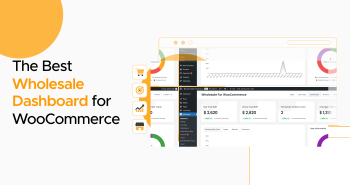
What does the B2B Analytics Dashboard in Wholesale for WooCommerce Cover?
The dashboard is specifically for wholesale operations rather than generic WooCommerce reporting.
Admins can instantly view:
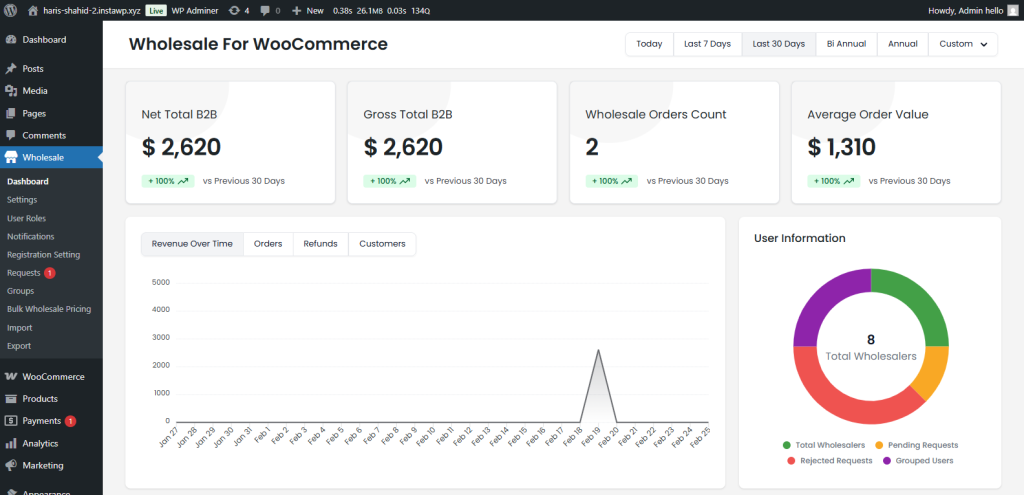
- Net total B2B revenue
- Gross wholesale revenue
- Wholesale order count
- Average order value (AOV)
This provides an immediate snapshot of wholesale business performance without navigating through multiple WooCommerce analytics screens. The visual reporting system also makes the dashboard feel more like a modern SaaS analytics platform than a traditional WordPress admin page.
Advanced Revenue Analytics
One of the strongest features is the Revenue Over Time graph.
Store owners can filter data using:
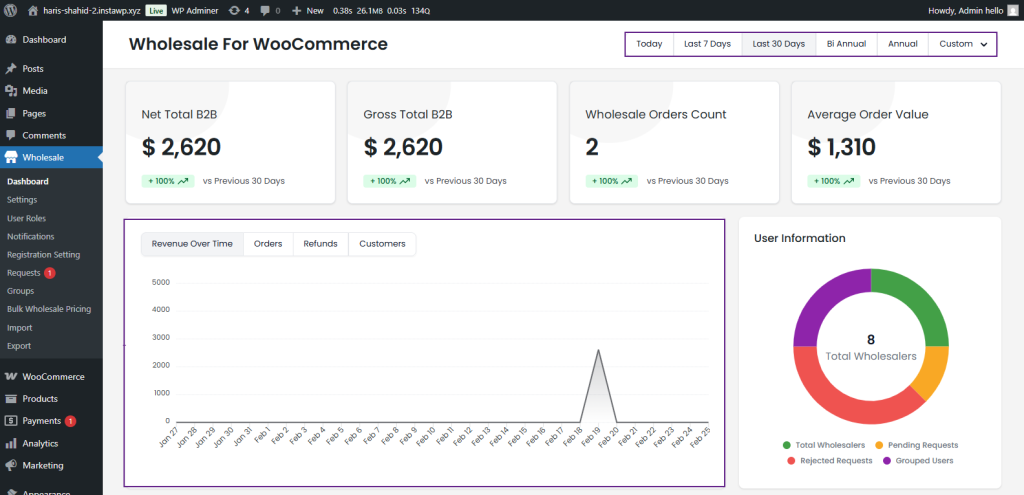
- Today
- Last 7 Days
- Last 30 Days
- Bi-Annual
- Annual
- Custom Date Range
This flexibility helps wholesalers analyze short-term sales activity and long-term growth trends from one place. Many competing plugins either rely on WooCommerce’s default analytics or provide only minimal reporting layers. Wholesale for WooCommerce delivers dedicated B2B-focused revenue visualization instead.
Customer & Registration Insights
Another major advantage is the customer analytics section.
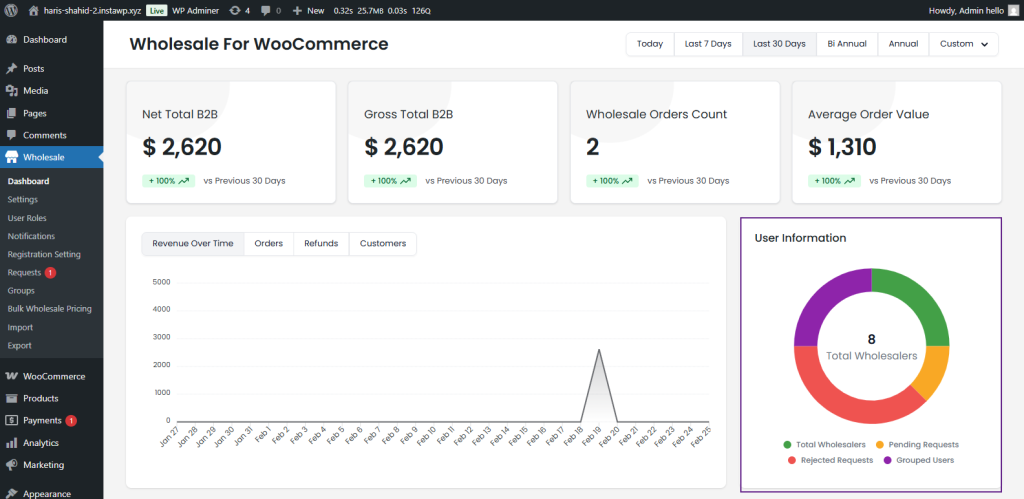
The dashboard includes donut-chart visualizations for:
- Total wholesalers
- Pending requests
- Rejected requests
- Grouped users
This creates a centralized customer management overview that most WooCommerce wholesale plugins simply don’t provide. For businesses handling large wholesaler onboarding pipelines, this visibility becomes extremely valuable. Managing those pipelines efficiently starts at registration — save hours and set up automated user role assignments in WooCommerce so every new application lands in the right tier without manual intervention.
Operational Visibility
The dashboard also excels in daily operations management.
Admins can monitor:
- Recent wholesale orders
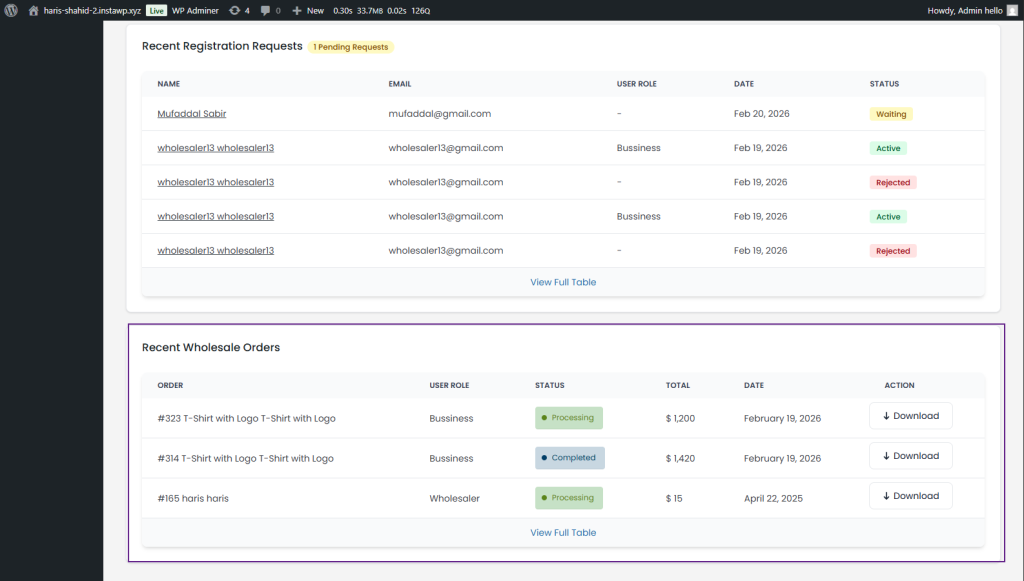
- Wholesale order statuses
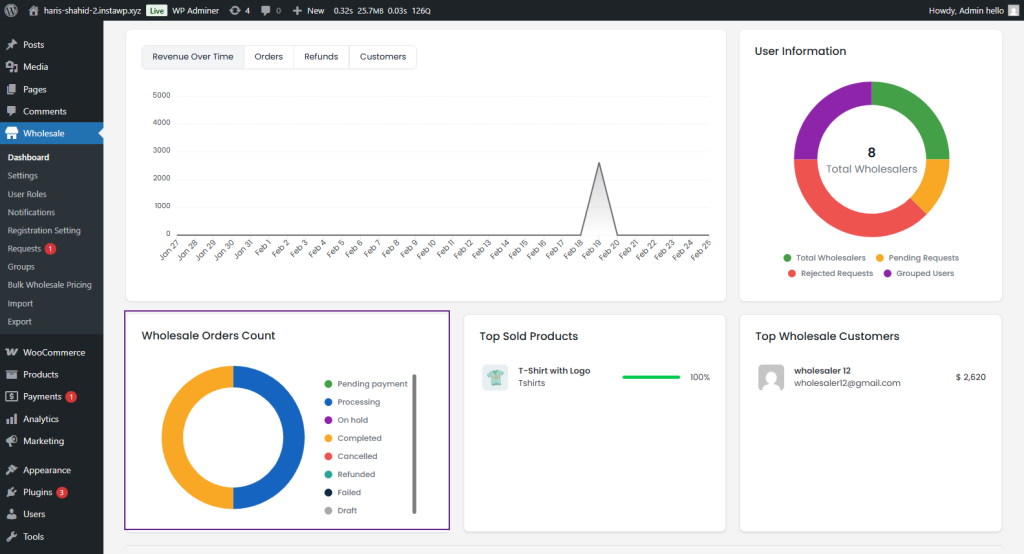
- Wholesale registration approvals
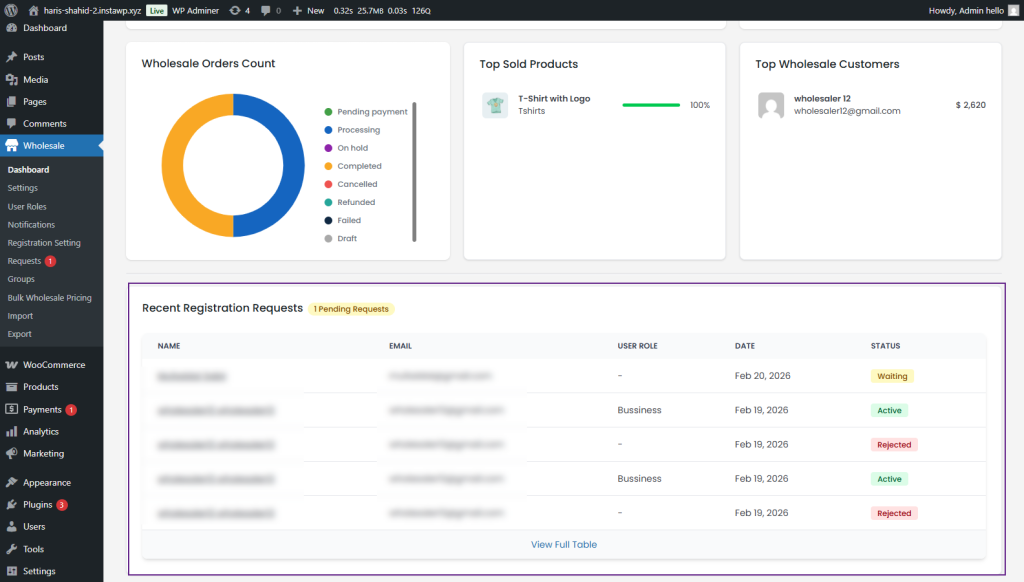
- Top wholesale customers
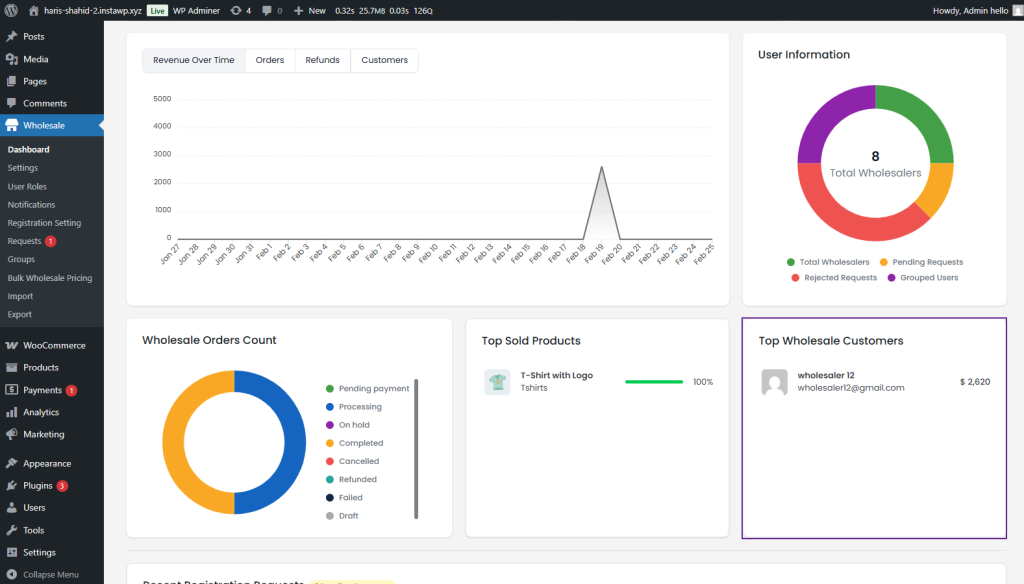
- Best-selling wholesale products
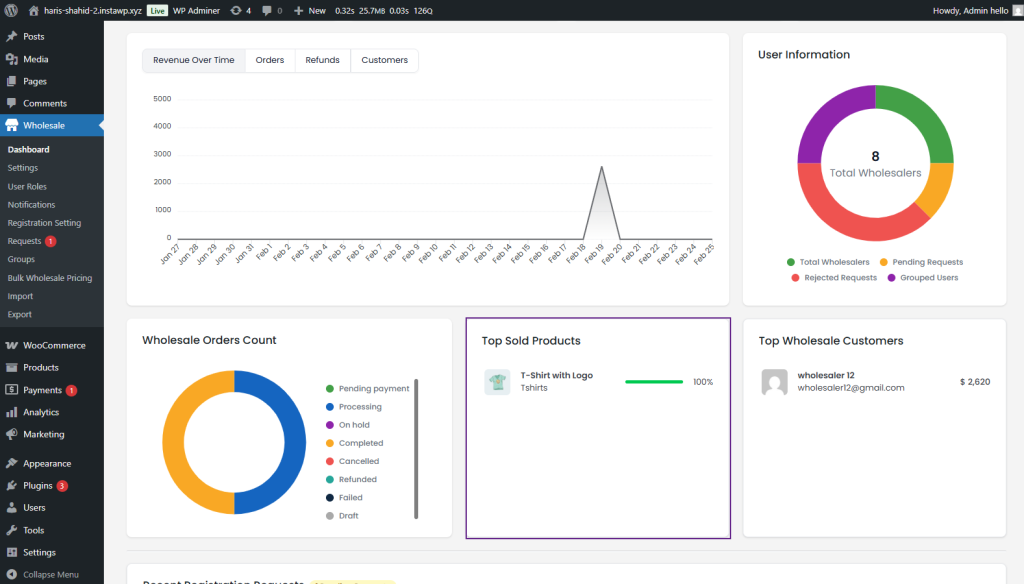
Instead of manually checking multiple WooCommerce sections, store managers get a centralized command center for wholesale operations. That operational workflow is where Wholesale for WooCommerce clearly separates itself from many competitors.
Dashboard Verdict: The most complete B2B analytics dashboard in the WooCommerce ecosystem, with the best functionalities for wholesale. Built specifically for wholesale operations, not adapted from retail analytics.
Pricing: Wholesale for WooCommerce free version is available for free on WordPress.org. If you want advanced and premium features, you can start at just $129/year. You can get B2B for WooCommerce from the WooCommerce marketplace, too.
2. Wholesale Suite: Solid Basics, Limited Visual Analytics
Best for: Budget-conscious stores that need wholesale pricing and basic reporting without heavy analytics.
Their dashboard, introduced with Wholesale Prices 2.0, covers the essential bases.
It is known for:
- Reliability
- Modular architecture
- Bulk ordering
- Wholesale pricing
- Registration workflows
Dashboard Experience
Wholesale Suite’s main focus is more on core wholesale workflows like top wholesale plugins, but not much focused on advanced analytics. Its reporting capabilities are functional but comparatively basic from a visual dashboard perspective.
The plugin’s modular architecture helps keep workflows manageable, but users looking for centralized wholesale business intelligence may find the dashboard less comprehensive than newer competitors.
Strengths
- Proven ecosystem
- Stable wholesale workflows
- Strong market reputation
Weaknesses
- Limited B2B analytics depth
- Less visual operational reporting
Dashboard Verdict: Functional but basic. Good for stores where reporting is a secondary concern.
Pricing: Free core plugin with basic features; premium bundles from ~$199/year
3. B2BKing: CRM-Focused Reporting, Not an Operations Dashboard
Best for: Stores that need deep customer account management and CRM-style B2B features.
B2BKing is a feature-rich wholesale plugin in the WooCommerce ecosystem. It comes with a built-in CRM hub, sub-accounts, VAT validation, quote workflows, and dynamic pricing rules.
It is known for:
- CRM-style account management
- Dynamic pricing and tiered rules
- Quote and negotiation workflows
- VAT handling and tax exemptions
- Multi-buyer company accounts
Dashboard Experience
B2BKing’s reporting reflects its CRM identity more than an operational analytics focus. It offers a dedicated Customers page with order history, notes, and file attachments per account, plus reports on gross and net sales filterable by B2B vs B2C.
However, the analytics live inside separate report pages rather than a unified dashboard. There is no real-time revenue graph, no time-based filter suite, no order status distribution chart, and no registration pipeline view, making it harder to get a single-screen picture of wholesale business performance. Getting that kind of clarity also depends on having your pricing structure set up correctly from the start — the WooCommerce Wholesale Pricing Guide covers how to build role-based and tiered pricing that your analytics can actually report on meaningfully.
Strengths
- Deep CRM and account management
- Comprehensive B2B feature set like Wholesale for WooCommerce
- Highly rated by enterprise users
Weaknesses
- No unified operational dashboard
- Analytics require navigating multiple pages
Dashboard Verdict: Strong for account management; limited for revenue trend analysis and operational oversight.
Pricing: From ~$179/year (Expensive compared to other WooCommerce wholesale plugins)
4. WholesaleX: Overview Stats with Basic Dashboard
Best for: Stores that want a modern freemium plugin with dynamic pricing and basic reporting.
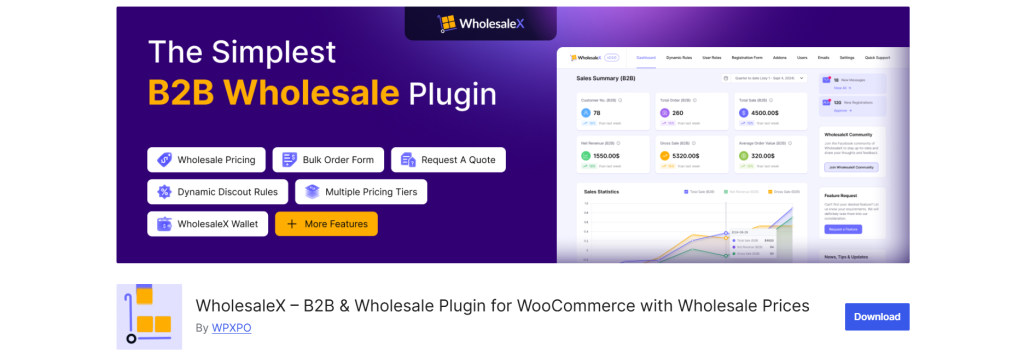
WholesaleX is a growing plugin and delivers a good set of features for a freemium plugin. It is particularly well-suited for stores building a flexible hybrid B2B/B2C setup without heavy upfront investment.
It is known for:
- Dynamic discount rules
- Hybrid B2B/B2C store support
- Built-in wallet system
- Quote request workflows
- Competitive freemium pricing
Dashboard Experience
WholesaleX offers a summary overview dashboard with basic sales metrics, and recent updates have added last week’s sales data. That said, the current dashboard lacks the multi-layer visual analytics a wholesale manager needs for confident day-to-day decisions.
There is no revenue-over-time graph with time-based filters, no order status distribution chart, and no registration management panel. Deeper analytics generally require the Pro version or third-party integrations, which adds friction for stores that need reporting built in from day one.
Strengths
- Strong freemium value
- Actively developed feature set
- Good hybrid B2B/B2C flexibility
Weaknesses
- Dashboard analytics are still maturing
- Advanced reporting is locked behind the Pro tier
Dashboard Verdict: Improving but still a basic overview, not a full B2B analytics dashboard.
Pricing: Free core; Pro plans available
5. B2B for WooCommerce: Enterprise Features, Fragmented Analytics
Best for: Enterprise-scale stores that need complex quote workflows, custom payment terms, and PDF invoicing.
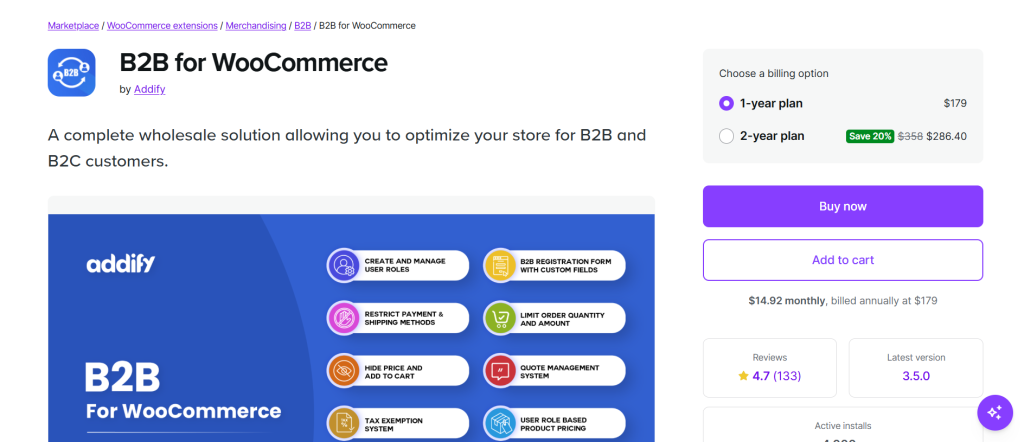
B2B for WooCommerce is a good option for larger wholesale operations with a structured, procurement-driven buying process. It handles Net30/Net60 payment terms, PDF quote generation, custom registration forms, and one-click reorder functionality with the depth to match genuine enterprise requirements.
It is known for:
- Net payment terms (Net30/Net60)
- PDF quote generation
- Custom B2B registration forms
- Role-based pricing and catalog control
- Enterprise procurement workflows
Dashboard Experience
This plugin prioritizes workflow management over analytics visibility. Reporting is available, but it is spread across different sections of the admin panel rather than consolidated into a single operational view. Analyzing wholesale performance separately from retail requires manually running reports across multiple pages.
There is no unified B2B dashboard that surfaces revenue trends, order status breakdowns, customer insights, and registration activity together. For a store manager who needs a quick read on wholesale business health, that fragmentation costs time every single day. Part of what makes fragmented analytics harder to work around is when wholesale products and pricing aren’t properly separated from retail in the first place — how to hide prices and wholesale products from retail customers is a foundational step that keeps your B2B data clean and your reporting accurate.
Strengths
- Excellent enterprise procurement features
- Strong quote and payment term management
- Solid option for complex B2B buying flows
Weaknesses
- No centralized B2B analytics dashboard
- Reporting requires navigating multiple admin sections
Dashboard Verdict: Powerful for enterprise workflows; analytics require navigating multiple sections.
Pricing: From $179/year
Wholesale B2B Dashboard Features: Side-by-Side Comparison
| Feature | Wholesale for WooCommerce | Wholesale Suite | B2BKing | WholesaleX | B2B (Addify) |
|---|---|---|---|---|---|
| Net & Gross B2B Revenue | ✅ | ✅ | ✅ | Basic | Partial |
| Average Order Value | ✅ | ✅ | ✅ | Basic | Partial |
| Revenue Over Time Graph | ✅ | ❌ | ❌ | ❌ | ❌ |
| Time Filters (Today / 7D / 30D / 6M / Annual / Custom) |
✅ (6 filters) | ⚠️ (4 filters) | ❌ | ❌ | ❌ |
| Order Status Distribution Chart | ✅ | ❌ | ❌ | ❌ | ❌ |
| User/Wholesaler Overview (Donut Chart) | ✅ | ❌ | ❌ | ❌ | ❌ |
| Top Wholesale Customers | ✅ | ✅ | ✅ | ❌ | ❌ |
| Top Sold Products | ✅ | ✅ | Partial | ❌ | ❌ |
| Registration Request Management | ✅ | ❌ | ✅ | ❌ | ✅ |
| Recent Orders in Dashboard | ✅ | ✅ | ✅ | ❌ | ❌ |
| All B2B Data in One Screen | ✅ | ❌ | ❌ | ❌ | ❌ |
The Bottom Line: Dashboard Is Where Wholesale for WooCommerce Wins
Every plugin on this list does a solid job on wholesale fundamentals. Pricing tiers, user roles, bulk ordering, and registration workflows are table stakes at this point. The real differentiator, especially for store managers and wholesale teams, is operational visibility.
Wholesale for WooCommerce is the only plugin in this comparison that delivers a genuinely comprehensive B2B analytics dashboard. It’s the one that shows revenue trends graphically, breaks down orders by status, surfaces top buyers and products, manages registration pipelines, and filters data across six time periods.
Wholesale for WooCommerce gives wholesale store managers an edge by enabling data-driven decisions based on tracking their B2B activities. The dashboard alone is a compelling reason to choose Wholesale for WooCommerce to manage growing wholesale & B2B businesses. For stores that are still building out their wholesale setup from scratch, how to add wholesale to WooCommerce in 2026 is the right place to start before focusing on analytics and reporting.
Ready to see the dashboard in action? Explore Wholesale for WooCommerce to run your B2B operations with the clarity they deserve.