Running a WooCommerce store and want to start selling to business or B2B buyers? You’re in the right place. Adding wholesale to WooCommerce isn’t complicated if you’re using the right setup. This guide walks you through everything about adding B2B and wholesale prices to WooCommerce. From creating wholesale user roles to configuring pricing, registration, and product visibility, now you must relax.
Disclaimer: We’ll be using the top-rated WooCommerce wholesale management plugin, Wholesale for WooCommerce.
What Is Wholesale in WooCommerce?
Generally, WooCommerce is for retail. It has one price, one type of customer, one checkout experience. Wholesale changes that because wholesale means selling products in bulk at discounted prices to a specific group of approved buyers, such as resellers, distributors, and business owners. One WooCommerce store, two worlds (wholesale and retail) apart, depending on whether you’re logged in.
What’s the Main Difference Between Wholesale & Retail?
The core distinction between retail and wholesale is all about price flexibility, minimum quantity restrictions, access control, and separate account management. WooCommerce does not support any of these features by default, out of the box, so you need a wholesale plugin.
Why Integrate Wholesale with WooCommerce?
Business clients have their own set of requirements. They need custom pricing, bulk-purchasing capabilities, and an overall tailored experience that isn’t possible with a traditional retail checkout. Without it, you’ll be losing out.
| Benefits of Integrating Wholesale in WooCommerce | Status |
| Attract high-volume B2B buyers to your store | ✅ |
| Offer custom pricing based on buyer tier | ✅ |
| Set minimum order quantities for bulk purchases | ✅ |
| Segment customers for targeted experiences | ✅ |
| Restrict payment and shipping methods per role | ✅ |
| Increase repeat orders from business accounts | ✅ |
With a full-scale integration of wholesale services with your WooCommerce store, you get an opportunity to generate larger order volumes. You get more businesses that buy from your business on a more frequent basis. And you would provide your customers with segmented pricing, customer support, and payment options according to their needs. For B2B stores looking to scale further, understanding why sales agents are the secret growth engine for B2B WooCommerce stores is worth considering alongside your wholesale setup.
Features You Get When You Integrate Wholesale in WooCommerce
First things first, let’s take a look at the main features of a WooCommerce wholesale integration solution:
- Wholesale user roles: To classify customers in categories (Standard, Premium, Platinum)
- Pricing rules: Global, for categories and products, with either fixed or percentage discounts
- Custom registration module: With administrator approval, notifications by email, and assigning user roles
- Visibility settings: To enable/disable product visibility, product price, and the cart for specific users
- Minimum order requirements: Minimum quantities and subtotals before offering wholesale prices
Step-by-Step: Add Wholesale Functionality to Your WooCommerce Store
Step 1: Creating Wholesale User Roles
User roles define who your wholesalers are, what discounts they get, and what they can do in your store.
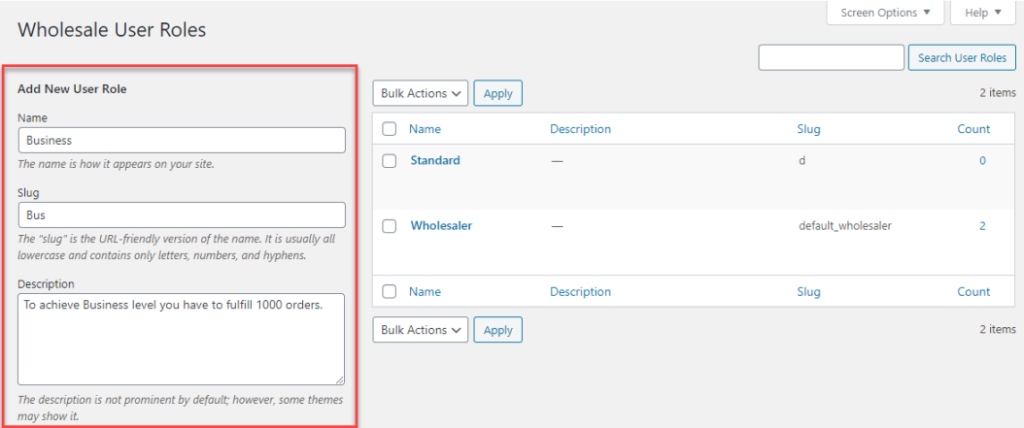
- Go to Wholesale → User Roles and click Add New Role
- Enter a name (e.g., Standard, Premium, Business), a slug, and a short description
- Choose between a single role (everyone gets equal discounts) or multiple roles (different tiers, different pricing)
- Set a default role so new registrants get entry-level access automatically
- Configure tax exemptions, disable payment gateways, and restrict shipping methods per role
Managing roles manually across a growing buyer base takes time. If you want to handle this more efficiently, you can save hours and set up automated user role assignments in WooCommerce so the right tier is applied without manual intervention.
Step 2: Setting Up the Wholesale Registration System
- Add the shortcode [wwp_registration_form] to any page to show your wholesale registration form
![WordPress editor screen showing a Wholesale Registration Form block containing the shortcode [wwp_registration_form].](https://wpexperts.s3.amazonaws.com/wp-content/uploads/store/2026/05/13072944/z2-1024x452.png)
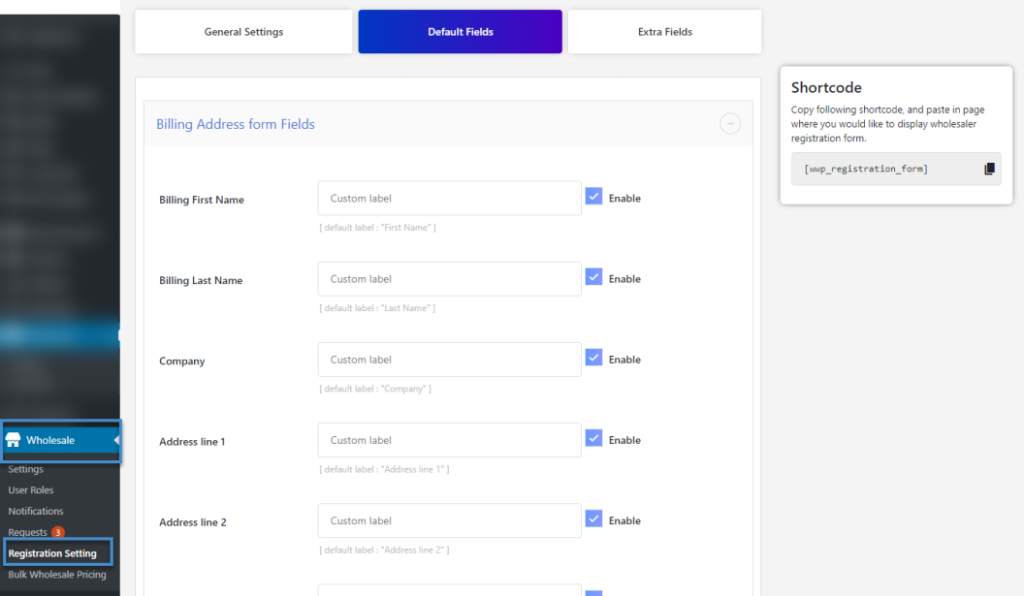
- Go to Wholesale → Registration → Default Fields to enable or disable billing address, shipping address, Tax ID, file upload, and custom text fields
- All submitted requests appear under Wholesale → Requests for review
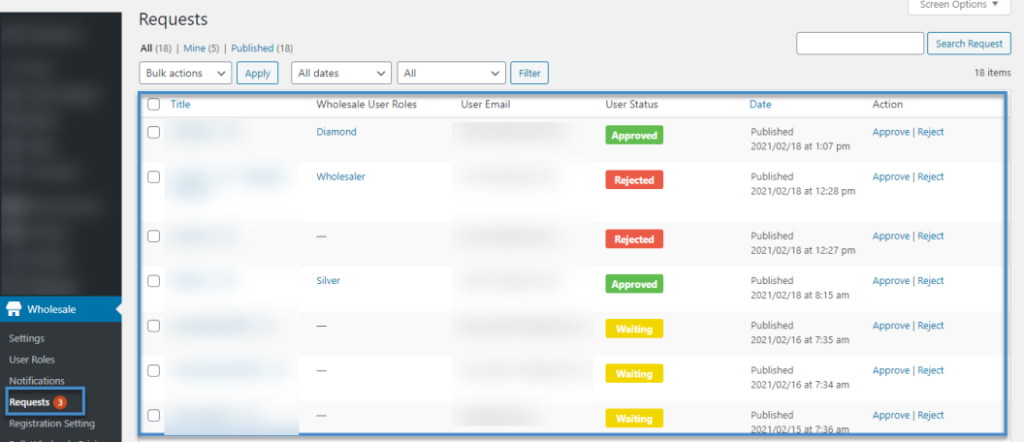
- Approve or reject applications, add rejection notes, and assign a role if multiple tiers exist
- Set up email notifications for each stage: new request, approval, and rejection
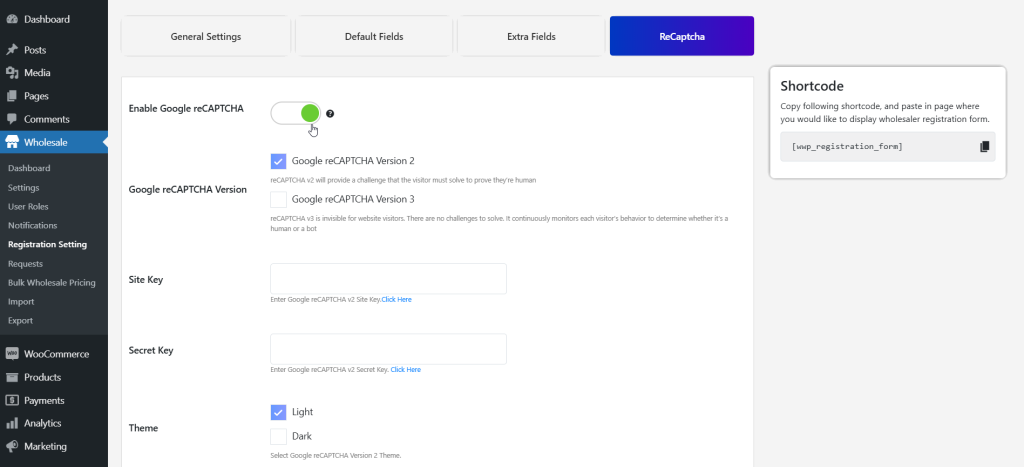
- Add reCAPTCHA V2 or V3 from registration settings to block spam
Step 3: Setting Up Wholesale Pricing
- Navigate to Wholesale → Settings → Wholesale Price Global to apply a discount across your entire catalog
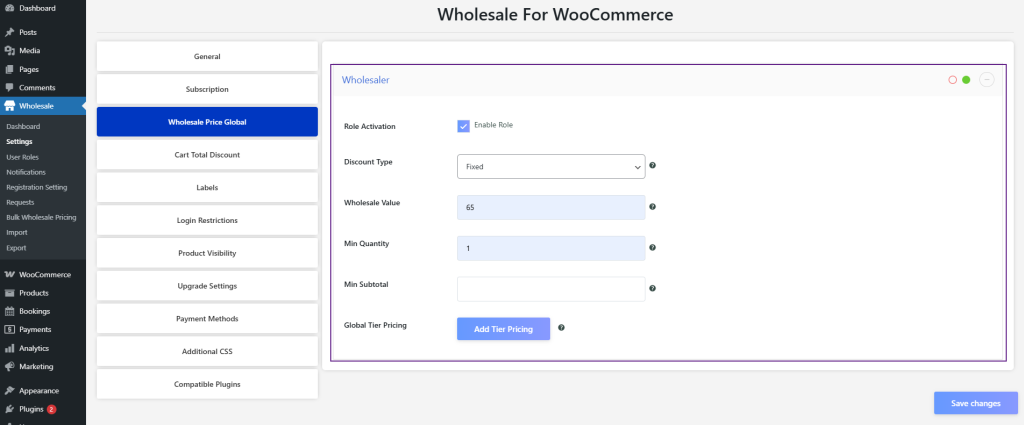
- Select Fixed or Percentage pricing, enter the discount value, and set a minimum quantity
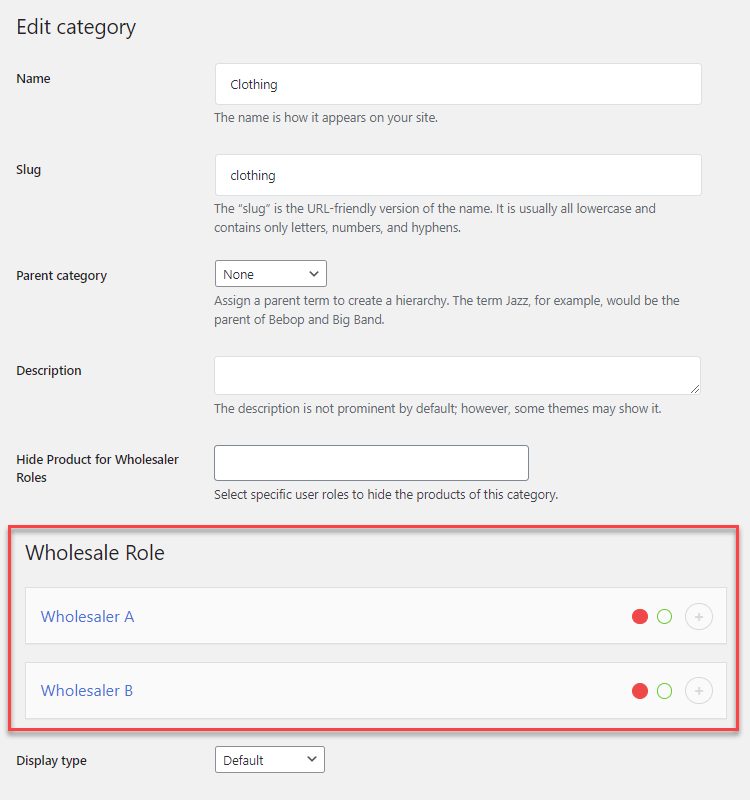
- For category-level pricing, edit any product category, go to the Wholesale Role section, and enter a price
- For individual products, edit the product, open the Wholesale tab, enable it, and add the wholesale price
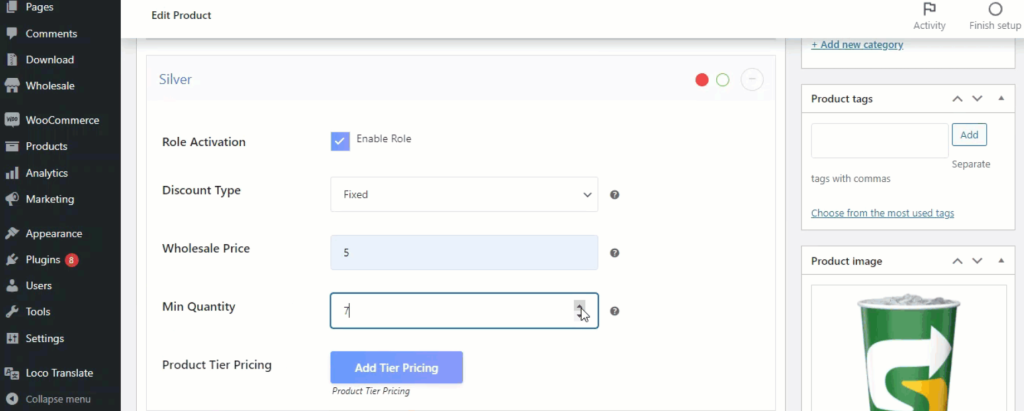
- Set up tier pricing to offer deeper discounts when customers hit certain quantity thresholds
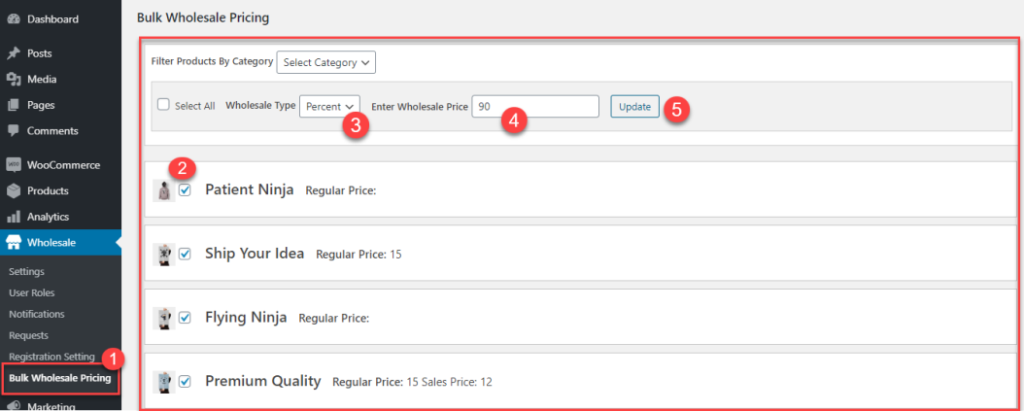
- Use Bulk Wholesale Pricing to update prices across your catalog. You can search by name, SKU, or role. Or export a CSV, edit it, and import it back
The WooCommerce Wholesale Pricing Guide goes deeper on structuring role-based pricing, tiered discounts, and cart-based rules if you want a more detailed walkthrough of this step.
Step 4: Restricting Product Visibility
- Enable Restrict Product Visibility to hide non-wholesale products from logged-in wholesalers
- Enable Restrict wholesale products globally to hide wholesale items from guests and retail customers
- Hide prices for non-logged-in users and replace them with a custom message like “Login to see pricing.”
- Hide the Add to Cart button for specific products, categories, or user roles
- Toggle off Retail & Save price labels under Labels settings if you don’t want wholesalers seeing retail comparisons
Getting visibility right across both buyer types is its own topic. If you want the full picture on this, the guide on how to hide prices and wholesale products from retail customers covers every control available in detail.
Step 5: Enable the Bulk Ordering Experience
Wholesale buyers think in quantities. A few features make bulk ordering smoother.
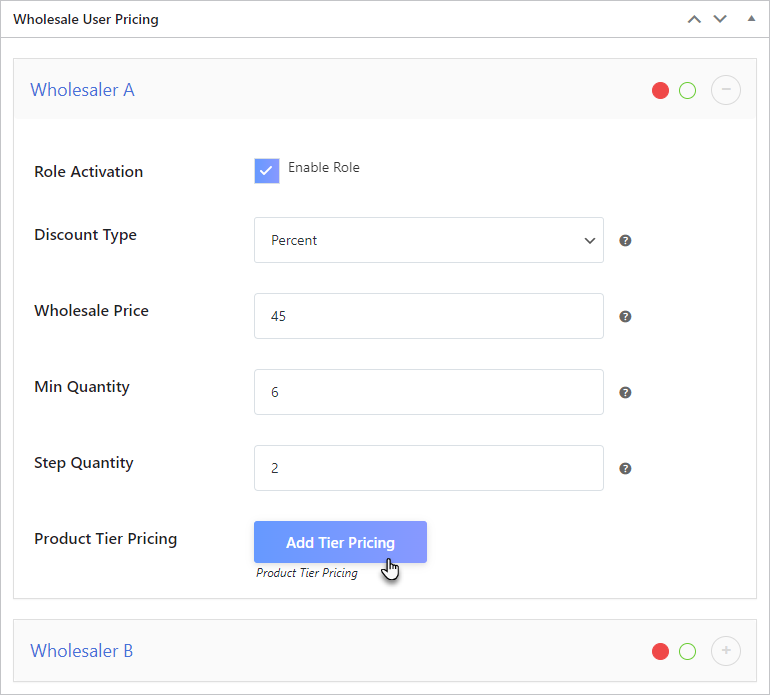
1. Step Quantity: It forces products to be added in set increments. Suppose it’s set to 6; customers can add 6, 12, or 18 units, but not 7. Set this in the product’s Wholesale tab alongside the Minimum Quantity field.
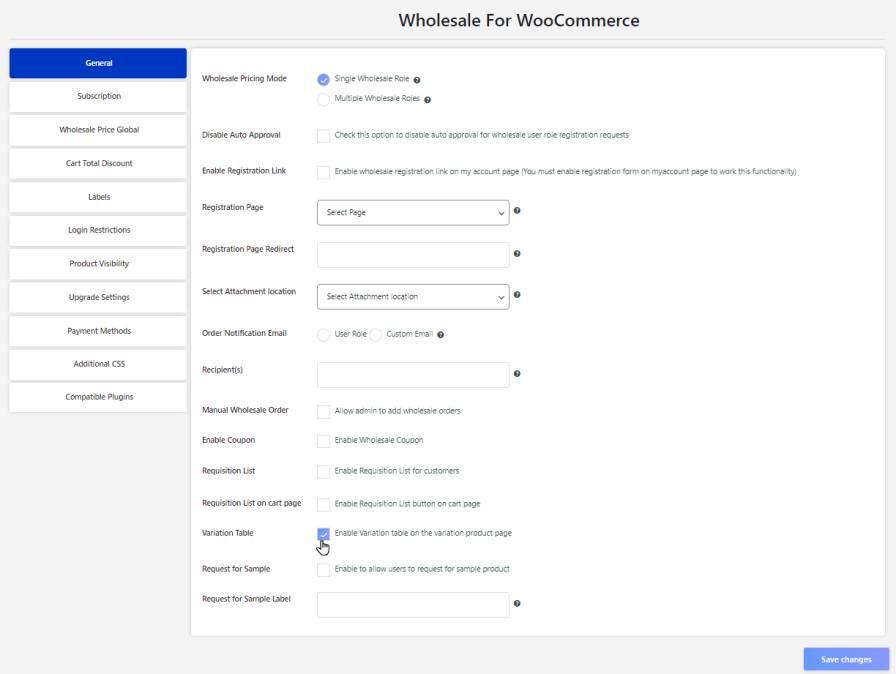
2. Variation Table (enabled from General Settings): It displays all variations of a product in a table view, so wholesalers can add multiple sizes or colors to their cart without clicking through individual dropdowns.
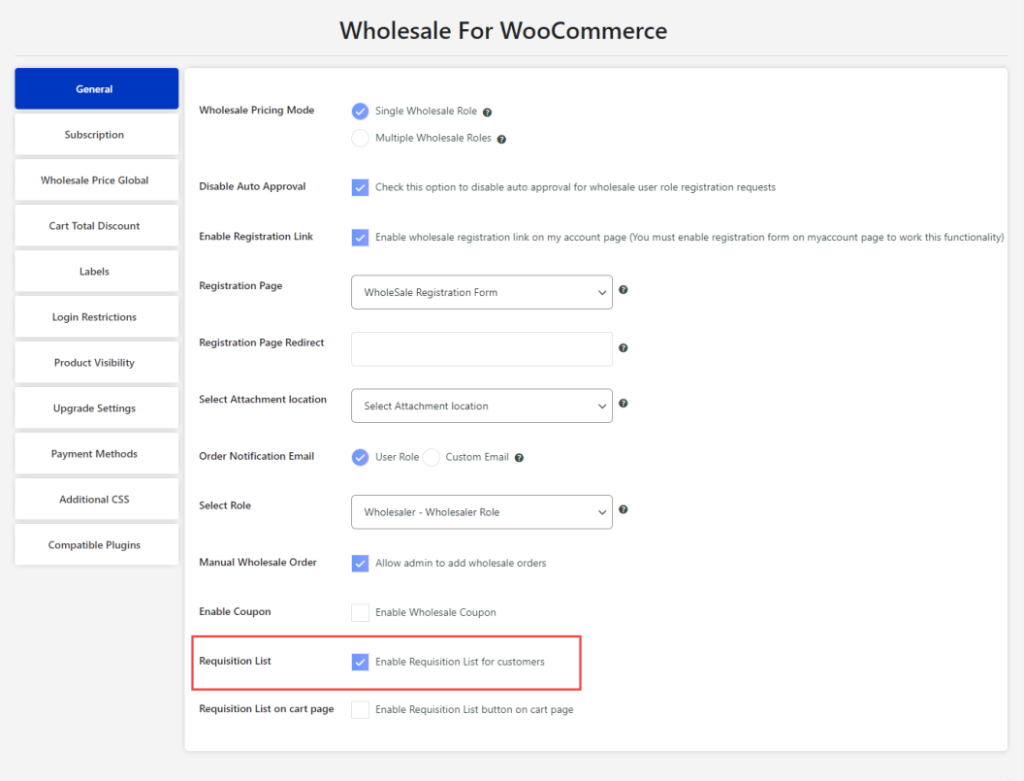
3. Requisition Lists: It lets customers save product lists, searchable by name or SKU, and add everything to the cart in one click. It’s essentially a purchase order tool that lives on the My Account page.
The Best Way to Add Wholesale Without Custom Development
Building this from scratch, including custom roles, pricing logic, registration workflows, and tax handling, would take months and cost significant development time. A purpose-built plugin handles all of it through a configuration interface.
Wholesale for WooCommerce covers:
- User roles
- Tiered pricing
- Registration and approval
- Product visibility
- Tax exemptions
- Payment restrictions
- CSV import/export
- B2B sales dashboard and more
It integrates with WooCommerce Subscriptions, Invoice Payment Gateway, Bulk Order Form for WooCommerce, and other popular extensions.
If you want wholesale on WooCommerce without touching a single line of code, the Wholesale for WooCommerce extension by WPExperts is the practical route.
Final Thoughts
Adding wholesale to WooCommerce is completely achievable without custom development. The key is having the right plugin and working through the setup methodically — roles first, then registration, then pricing, then visibility, then the bulk ordering experience.
Once it’s running, you’ve got a fully functional B2B store sitting alongside your retail operation, with complete control over who sees what and at what price.